Showing posts with label FREEWARE. Show all posts

Friday, November 29, 2013

Re-Enable Registry Editor, Command Console, etc

ASALAMUALAIKUM WR WB


Re-enable was designed to repair the left over damage caused by Viruses,Malware Trojans.
By now most of you will already know that viruses that disable such critical Windows features
are very common. Once the virus disables any of the feature, common users have no choice
but to reinstall the Windows or perform complicated registry changes.
Re-Enable plans to change all this with a dead-simple tool.

With one click Re-enable will repair the following windows features.

Re-enable version 2 has been tested with daprosy worm - sality AA and other
sality variants - fake antivirus ‘s  and many more with 100% success

Make sure the viruses have been removed before running re-enable for best results however
If you do run re-enable with viruses still running the viruses may undo re-enables repairs.
For a list of virus removal tools see the download page. If re-enable fails in any way ,chances
are the virus is still running.

Requires Microsoft .net framework 3.5 Sp1 or above. Or for none .net framework Pc’s there's
a portable version ,I would recommend that you use the .net version as its size is considerably
smaller or use the installer version.
Portable version runs on any pc or laptop that doesn't have .net framework installed because
the .net framework is included in the code ,this is why the size is larger than the normal exe


 Re-enable is free for personal and none commercial use only.
Commercial usage please contact me
Thank you for taking in a interest in re-enable ,if you feel that re-enable v2 helped you in
any way please consider donating to the project by clicking the donate link.

wasalamualaikum wr wb


Arek NGAJUM IsoIso Ae [ The Fully Fuckin' Headache Lion ]

Tuesday, November 26, 2013

IceDragon: A faster, more secure version of Firefox

ASALAMUALAIKUM WR WB

Features
    Fast, easy to use and light on PC resources
    Scan web-pages for malware right from the browser
    Lightning fast page loads with integrated DNS service
    Privacy and performance enhancements over Firefox core
    Full compatibility with Firefox plug-ins
ice
Comodo IceDragon [Firefox core]

Comodo Dragon[Chrome]


Overview
Comodo IceDragon is a fast and versatile Internet browser based on Mozilla Firefox which features several security, performance and feature enhancements over the core build. Fully compatible with Firefox plug-ins and extensions, IceDragon combines the freedom and functionality of Firefox with the unparalleled security and privacy of Comodo.

System Requirements
    Windows 7 / Vista / XP – 32/64 bit
    128 MB RAM
    40 MB Hard Disk Space

IceDragon is made possible by the Firefox open source project based on Firefox 25.0.0.1

Features

SiteInspector's link scanning feature allows you to check whether a web page is malicious before you actually visit that page. To scan a page that seems suspicious to you, simply right-click on the link to that page and click 'Scan Link'. Alternatively, the SiteInspector button at the top corner of IceDragon allows you to instantly scan the page you are looking at to find out if it contains viruses or other malware. When the scan is complete, you'll see a detailed breakdown of site safety, domain registration details, administrative contacts and a history of previous malware scans on that website.
Secure DNS service

IceDragon users are also given the option to use Comodo's Domain Name System (DNS) servers, free of charge. Doing so brings about several advantages, including:

    Web-pages load faster – Comodo operate a huge network of fully redundant DNS servers located at optimal locations around the world. This means your requests for web-pages are always resolved by the high performance DNS cluster closest to you. The result? Websites load faster than if you continue to use the DNS server provided by your ISP (which you share with all their other customers).
    A safer Internet experience - SecureDNS helps users keep safe online with its malware domain filtering feature. SecureDNS references a real-time block list (RBL) of harmful websites. These include phishing sites, malware sites, spyware sites, and parked domains that contain excessive advertising. You'll be warned whenever you attempt to access a site containing such potentially threatening content. Our highly secure infrastructure also reduces your exposure to DNS poisoning attacks.

Social media integration
Found an interesting page or video? IceDragon's dedicated social media button makes it easy to instantly share your web-finds with your Facebook, Twitter or LinkedIn friends.
Privacy and performance enhancements

IceDragon features several tweaks to the core Firefox build to improve both security and performance. These include the removal of crash report and performance data submissions, the removal of the snippets service, an all new update module and many other under-the-hood enhancements. We think this make IceDragon the fastest and most secure version of Firefox around.

Designed with you in mind
The IceDragon interface doesn’t just look good – it’s the result of thousands of hours of careful usability testing. We’ve put everything you need in clear view to make sure you accomplish what you want, fast!

FAQ

What's the difference between Mozilla Firefox and Comodo IceDragon?
    IceDragon features privacy and performance enhancements over the Firefox core browser as well as additional features such as SiteInspector malware scanning, Comodo Secure DNS and improved social media functionality.
Is there a 64 bit version of Comodo IceDragon?
    Not currently. However, we hope to add one in the near future. The 32 bit application will still work perfectly on 64 bit operating systems.
What's the difference between Comodo IceDragon and Comodo Dragon
    Comodo Dragon is based on the Chromium engine used by Google Chrome. IceDragon is based on Firefox.
Which should I choose: Comodo Dragon or Comodo IceDragon?
    The choice is yours! Both versions of Dragon feature security and privacy improvements over the originals and both feature additional Comodo tools and services. Our goal is to offer a secure, feature-enhanced alternative to both Chromium and Firefox user-bases while retaining the benefits and user experience of the original browsers. If you prefer Firefox, try IceDragon. If Chrome is the browser for you, then why not give Dragon a whirl?
Why is a Browser that provides greater security and privacy necessary?
    Because malware plagues the Internet. In 2009 alone, more than 25 million new strains of malware were created, causing a 400% jump in compromised Web sites worldwide. Venturing onto the Web today (in an age in which one continually reveals social security, bank account and credit card numbers as well as a plethora of other sensitive data) can be like walking down a hallway with portraits on the walls. Portraits with eyes that watch everything you do and people hidden behind them ready to take advantage, based on what you let them see! Never have you needed to protect your privacy more on the Web!
Will Comodo IceDragon run on my computer?
    Comodo IceDragon will run on 32/64 bit Windows 7, Windows Vista and Windows XP.
Is Comodo IceDragon open source software?
    Yes. IceDragon is licensed under the the MPL (Mozilla Public License). IceDragon source code can be obtained from download.comodo.com/icedragon/icedragon.zip
Will trying Comodo IceDragon cost me anything?
    No. Comodo IceDragon is absolutely free. Much like many of the other innovative Internet solutions offered by Comodo

Support for Comodo IceDragon

User Guide
For help with CID, check out our online user guide.

Comodo Forums
Our community message board has a dedicated sub-forum for discussing Comodo IceDragon.
You'll benefit from the expert contributions of developers and fellow users alike and can find answers to any questions you may have.

Join free at forums.comodo.com
Email Support
If you are unable to find a solution in either the help guide or the forums, then please email support at dragonsupport@comodo.com

Please note that phone support is not available for our free products

wasalamualaikum wr wb


Arek NGAJUM IsoIso Ae [ The Fully Fuckin' Headache Lion ]

Sunday, November 17, 2013

Folder Lock 7.2 Secure Your Documents

ASALAMUALAIKUM WR WB


What is Folder Lock?
Folder Lock lets you password-protect files, folders and drives; encrypt your important files on--the-fly; backup them in real-time; protect USB drives and portable devices; shred files and clean history. Folder Lock is the most downloaded file-security application with more than 25 million users.

DOWNLOAD LINK AT THE BOTTOM OF THIS PAGE
Folder Lock 7

Why Folder Lock?

Folder Lock is a revolutionary concept in data security that allows you to not only lock and/or encrypt your files and folders but also optionally backup your encrypted data to an online account, keeping your data synced at all times so that you won't have to worry about the confidentiality of your data as well as data loss. Besides encryption and secure backup of your files, Folder Lock provides additional award-winning data protection features like Lock Files, Protect USB / CD, Make Wallets, Shred Files, and Clean History.

Folder Lock is the ONLY data protection with an online backup solution providing true end-to-end encryption and password protection of all your personal and confidential files at all times. With advanced government-level 256-bit AES encryption on your desktop and 128-bit encryption for all online communications, Folder Lock gives you End-to-End data security to protect all your data, thus, maintaining data confidentiality and integrity at all times.

Features:

    Advanced (Military Grade) 256-bit AES Encryption
    Secure Online Backup of your Encrypted Files
    Choice of either Locking or Encryption of Files
    Protect your data in USB, External Drives and CD/DVD
    Real-time, On-the-Fly and Automatic Encryption & Decryption
    Lock, Hide and Password-Protect files, folders and drives
    Make Digital Wallets to protect your personal and private information
    Shred and Permanently Delete Files and Empty Hard Drive Space
    Clean Windows Usage History and Traces for Privacy Reasons
    Create Encrypted Email Attachments for sending Email Attachments
    Stealth Mode Option to hide the application while running in background
    Automatic Protection to protect all files after a certain time
    Enhanced Password Security and Administrative Password
    Hack Security to log and disable users trying too many incorrect passwords
    Virtual Keyboard to enter passwords to prevent possible key logging of passwords
    Password Strength Meter to indicate the strength of password you set
    Drag and drop functionality to protect files instantly
    Expandable Lockers, so no worry when dumping more files for encryption later
    Backup, Restore and Sync encrypted files online as well as among different PCs
    100% Foolproof Encryption with defences for Dictionary Attacks and Hacks
    Fast, Secure, Easy to Use and Efficient in what it does
    Keep Encrypted Data on Servers and Share among Employees on a Network
    Supports Windows 7, Windows Vista, Windows XP, Windows 2008 Server

With more than 515 million records breached since January in the Unites States alone, leaving this kind of information and data open for access is a dangerous game, even for the well-versed of users.

Protecting your data and information from certain unwanted and prying eyes may become a dilemma if you end up with enough personal and private data on your computer or on your external storage devices.

With information changing hands and data transfer figures at record numbers, critical files and folders like these need robust protection so that intruders or unauthorized users are stopped right in their tracks - whether to read, view, copy, move, or delete them. IF it is personal or confidential, it NEEDS protection!

Files and folders left unprotected can lead to theft, data-loss, and breaches of your privacy, costing you embarrassment, money, lost data, and maybe even your job!

Folder Lock uses government-level 256-bit AES encryption for protecting your files. Unlike slow encryption programs, the program uses on-the-fly encryption, a technology that takes seconds to encrypt - even GBs of data. Using this technology, when Folder Lock opens the data contained in a Locker, it does not decrypt each and every file. Rather, only those files and folders are decrypted; that need access. And since files are decrypted into RAM instead of the Hard Disk, this gives you an added security benefit because – 1) Recovery of files is not possible from the Hard Disk, as there was nothing there in the first place; and 2) Data decrypted in RAM is cleared automatically after a system shutdown or restart.

Following is a list of the comprehensive and award-winning features and benefits that have made Folder Lock a revolutionary product in data protection and security:

    Folder Lock is the most comprehensive data protection suite with seven (7) tools; Lock Files, Encrypt Files, Secure Backup, Protect USB/CD, Make Wallets, Shred Files and Clean History.
    Easily Lock and hide files, folders and drives in one fell swoop. Simply drag and drop items in 'Lock Files' and double click to run them. No need to unlock them to be able to run them. Protection works in Safe Mode also.
    Fastest Encryption on Earth! Folder Lock's 'Encrypt Files' offers the fastest 256-bit AES Encryption ever
    achieved. It uses a patent pending technology that allows the virtual drive to expand automatically depending on how much new data in dumped in, while leaving very small initial footprint when created.
    Option to either Encrypt or Lock, choices useful for both power users and casual users. Those who want ultimate security can choose encryption. Those who want ultimate speed can choose locking.
    Unmatched online backup of your encrypted files. End-to-End data protection at all times for secure data protection from start to finish. All end points are covered with industry-standard encryption protocols at all data touch points to render any interception efforts useless.
    Secure online backup of all your Lockers using industry-standard 128-bit SSL encryption for communication with our online storage servers. Government level encrypted communication during ALL online backup sessions.
    Unlike other data protection products in the market, Folder Lock saves you enormous time and resources by putting all your files and folders in one location – Locker!
    Convenient on-the-fly encryption and decryption for ALL your online backups. All data is encrypted

    instantaneously when copied to the Locker. No next steps to encrypt. Furthermore, the decryption is automatic and takes place in the memory, leaving no decrypted file on the hard drive ever.
    A strong industry standard 256-bit AES Encryption is used to encrypt your files for maximum protection. It is one of the most trusted encryption algorithms used in United States Government, including the U.S Military.
    Lockers CANNOT be deleted on the computer where Folder Lock is installed (based on user settings) and Folder Lock CANNOT be uninstalled without the correct password (based on user settings).
    Create and store Wallets to store ALL your confidential information in a secure way. All information is encrypted and safe. Wallets can be emailed or copied to your USB Drive for viewing on another computer.
    Folder Lock offers full portability. Apart from USB Flash Drives, Folder Lock can even protect CD/DVD-RW, Memory Sticks, and floppy disks. Simply use Protect USB/CD feature to convert and copy or burn your Locker(s) to your chosen external storage devices.
    Portable Lockers with self-executable applications run without the need to install Folder Lock on other machines. Take data anywhere without the hassle, worry and fear.
    Permanently Remove ALL data beyond the point of recoverability. Using a mix of Shred Files and Clean History, you can get rid of any recoverable information on your computer if your spouse or boss is spying on you.
    Transfer your Locker(s) through emails. Simply share the Locker password with the person you wish to allow access to the protected data in that Locker. Your encrypted data CANNOT be viewed by anyone else, even if they break through your email attachments in between.
    Folder Lock works flawlessly on all Next Technology Windows, i.e. Windows 7.0/ Vista / XP/Windows 2003 & 2008 Server and their 32 and 64 bit variants. It is also fully compatible on all disk drives types including FAT16, FAT32 and NTFS.
    Use Hack Attempt Monitoring feature to maximize protection against incorrect password attempts. Trigger Folder Lock to Exit Application, Log-Off Windows, and System Shutdown upon multiple incorrect password attempts.
    Check Password Strength meter shows you the strength of the password as you type. Basic rule-of-thumb is to use a password that is easy enough to remember but hard enough to easily guess.
    Folder Lock does NOT save passwords on disk or in the Windows registry, preventing hackers and crackers. Folder Lock is clean, clear and extremely powerful in what it does.

Additionally, using the 'Lock Files' feature you can quickly lock and/or hide each file, folder, or drive you specify without requiring you to move or copy your data to a Locker. All locked items are listed in 'Lock Files'. This list not only helps to organize viewing of your Locked files, but also allows you to quickly edit files, with options to enable/disable the protection per item according to requirements. This removes the hassle of having to unlock and unhide each file and folder separately.

Important!

Even though locking is fast, it is strongly advised to consider encryption for your most important data.

Folder Lock is also one of the best data protection tools for protecting all your portable devices. USB Flash Drives, external hard drives, pen drives, Zip drives, floppy disks, even CDs/DVDs-RWs. You have the option to either create a new Locker on, or move/copy an existing Locker to, your selected external drive.

Protecting your data on external drives is fast and extremely easy to implement. To secure your files directly onto your external drive, simply select the 'Create Locker' option in the application and select your chosen external drive as the destination for your new Locker. Additionally, select 'Move/Copy Locker' to move/copy an existing Locker to your external drive. Please note that, by default, Lockers are created in your computer's 'My Documents' folder.

Portability of your protected files enables you to take your password-protected files anywhere you want without the fear of data-loss or -theft.

Folder Lock has been a cutting edge program in data protection and security applications with a robust and comprehensive suite of data security functions and provides advanced data security features for users with government-level data protection needs.

Over 25+ Million downloads. So Far!


Unlock Password: hari arek nggantheng

ENJOY PC SECURE OFFER By PIRATES

wasalamualaikum wr wb


Arek NGAJUM IsoIso Ae [ The Fully Fuckin' Headache Lion ]

Thursday, November 14, 2013

DNS JUMPER v1.0.6 [ Support Windows 8 ]

ASALAMUALAIKUM WR WB


by velociraptor
DNS Jumper W 8-1
DNS – or domain name system – is the protocol on the internet that turns human-comprehensible website names such as sordum.org into addresses understandable by machines.(machine-readable “IP addresses”) , In some cases, you can increase the browsing speed or improve your security by replacing the DNS provided by your provider , DNS Jumper is a tool which makes it easy for you

Why should you use DnsJumper:
1. It could help you reach websites where access has been blocked.
2. It might improve your security by using secure DNS servers.
3. It can protect your children from inappropriate websites and can Block Porn Sites. (Just use one of the Family safe DNS)
4. It can speed your browsing (move to a faster Domain Name Service)
5. Changing your settings manually can take a little work , But with DNS Jumper it’s relatively easy (one click)
Dns jumper v1.0.6 has now Ipv6 support and dozen innovation ,such as you can easily create your own Dns groups , you can see your current dns easily… usw. Dns jumper is Portable and Freeware
DNS Jumper W8-2

What is new:
1. [ Fixed ] – Dns Jumper enables CheckBalloonTips registry enrty Automatically (REG_DWORD=1) (If you want to disable it , Just edit DsnJumper.ini and change CheckBalloonTips=True to False)
2. [ Fixed ] – Updates messages are only in English language
3. [ Fixed ] – Languages doesn’t sorted in alphabetical order
4. [ Fixed ] – Minor corrections of codes

How to Change Your DNS Settings
DNS Jumper W 8-3

1. Select one of them (Under Choose a DNS Server combo)
2. Click “Apply DNS” button
Note: For IPv6 just tick the IPv6 checkbox

How to Restore your DNS settings or Use your ISP’s Default DNS again
There are two ways to do that:
1. Click “Quick configuration” button (has Star icon) and Pick Your Choice or
2. Under the Choose a DNS Server combo select “Restore” or “Default” and then click “Apply DNS button”
Note: For IPv6 just tick the IPv6 checkbox
DNS Jumper W 8-4

Our DNS list is just a samle , Please don’t use unsecure DNS servers , we are not responsible for any illegality or damage. Until now  DNS jumper has been downloaded more than 1.800.000 times (our server + Other web resources) THANKS FOR YOUR TRUST

Supported operating systems: Windows Xp , Windows Vista , Windows 7 , Windows 8 , Windows 8.1 – (x86 & x64)


Supported languages: English , Turkish , German , Swedish , Italian , Spanish , Portuguese-Brazil , Korean , Romanian , Chinese (Simplified) , Chinese (Traditional) , Arabic , Czech , Japanese , Finnish , Vietnamese , Dutch , French , Russian , Malay-Malaysia , Slovenian , Indonesian , Hungarian

A special thanks to translators:
Swedish : Åke Engelbrektson
Italian : Eligio Greco
Spanish : Óscar Cuesta
Portuguese-Brazil : Pedro Gabriel Schneider
korean : 4Li
Romanian : Florin David
Chinese (Simplified): Chonghua
Chinese (Traditional): Danfong Hsieh
Arabic : ismail ar
Czech : Mikrom
Japanese : yamada
Finnish : Petri Lietjärvi
Vietnamese : Vanxuanemp
Dutch : Ard Sur , Geert Delmeiren
French : Tophechris
German : Velociraptor – Corrected by Mikka
Russian : Andrey Zaikin
Malay-Malaysia : Suhaimi Shaarani
Slovenian : Sloprlek
Indonesian : (Arif Wicaksono)
Hungarian : Bluestar


wasalamualaikum wr wb


Arek NGAJUM IsoIso Ae [ The Fully Fuckin' Headache Lion ]

Friday, May 10, 2013

Edit your MP3 file to your custom way [ MP3Tag Freeware ]

ASALAMUALAIKUM WR WB


Have download some mp3 music files to your computer ?. Did you want to change this file to your custom setting. So you can taste what you want when your file play in music player programs or on your phone device. 
I offer you to try this freeware program made by brilliant germany's team.

Mp3tag v2.55a - the universal Tag Editor and more


Mp3tag is a powerful and yet easy-to-use tool to edit metadata of common audio formats where it supports ID3v1, ID3v2.3, ID3v2.4, iTunes MP4, WMA, Vorbis Comments and APE Tags.

It can rename files based on the tag information, replace characters or words in tags and filenames, import/export tag information, create playlists and more.

Mp3tag supports online database lookups from, e.g., Amazon, discogs, or freedb, allowing you to automatically gather proper tags and cover art for your music library.


Mp3tag supports the following audio formats:

    Advanced Audio Coding (aac)
    Free Lossless Audio Codec (flac)
    Monkey's Audio (ape)
    Mpeg Layer 3 (mp3)
    MPEG-4 (mp4 / m4a / m4b / iTunes compatible)
    Musepack (mpc)
    Ogg Vorbis (ogg)
    IETF Opus (opus)
    OptimFROG (ofr)
    OptimFROG DualStream (ofs)
    Speex (spx)
    Tom's Audio Kompressor (tak)
    True Audio (tta)
    Windows Media Audio (wma)
    WavPack (wv)


Main features:
Batch Tag Editing Write ID3v1.1, ID3v2.3, ID3v2.4, MP4, WMA, APEv2 Tags and Vorbis Comments to multiple files at once.
Support for Cover Art Download and add album covers to your files and make your library even more shiny.
Import from Amazon, discogs, freedb, MusicBrainz Save typing and import tags from online databases like Amazon, discogs, freedb, MusicBrainz, and more.
Replace characters or words Replace strings in tags and filenames (with support for Regular Expressions).
Create Playlists automatically Create and manage playlists automatically while editing.
Rename files from tags Rename files based on the tag information and import tags from filenames.
Export to HTML, RTF, CSV Generate nice reports and lists of your collection based on user-defined templates.
Full Unicode Support User-interface and tagging are fully Unicode compliant.
Besides these main features Mp3tag offers a variety of other functions and features ranging ranging from batch export of embedded album covers, over support for iTunes-specific tags like media type or TV Show settings, to combining multiple actions into groups that can be applied with a single mouse click.


wasalamualaikum wr wb


Arek NGAJUM IsoIso Ae [ The Fully Fuckin' Headache Lion ]


Friday, August 31, 2012

DOWNLOAD MP3 Gratis [SONGR mp3 Engine]

ASALAMUALAIKUM WR WB


SONGR ver 1.9.47.0 by ANDREA MARTINELLI


      Sebelum kita memulai membuka kembali blog ini, perkenankan saya menyampaikan permohonan maaf yang se-tulus-tulus-nya kepada semua rekan-rekan. Apabila ada guratan saya di blog ini yang tidak sopan atau tidak berkenan saya mohon maaf yang se-tulus-tulus-nya. Dan MOHON MAAF LAHIR DAN BATHIN [MINAL AIDIN WAL FAIDZIN]

       Kali ini kita keluar sebentar dari kebiasaan membahas masalah yang terjadi pada berbagai jenis handphone. Yang kita bahas kali ini adalah bagaimana caranya untuk memutar file musik kesukaan secara online dan gratis serta mendownloadnya juga. Tentu akan lebih mudah ketimbang harus keluar masuk situs-situs musik yang ada di jagat maya.

       Adalah sebuah mesin kecil hasil karya kang ANDREA MARTINELLI yang akan saya perkenalkan kepada anda. Sejatinya mesin ini lebih layak disebut sebagai BROWSER MUSIK. Menawarkan berbagai kemudahan dari antar muka tampilan-nya yang sangat mudah difahami. Apa yang anda cari tinggal ketik saja di search bar lalu klik enter maka munculah semuanya. Sebelum anda mendownload mesin ini silakan anda lihat-lihat dulu. Link unduh akan saya berikan pada bagian akhir posting ini.

Gambar berikut adalah tampilan dari SONGR anda
       Untuk mencari musik MP3 kesukaan anda ketik judul lagu atau grup band yang anda inginkan pada search bar. Atau bisa juga dengan meng-klik Search by lyrics dengan prosedur yang sama.
Pada log bagian atas hasil pencarian anda akan ditampilkan. Klik kanan lagu yang anda inginkan kemudian pilih SEARCH. Kemudian akan ditampilkan seluruh lagu yang sama dari berbagai situs yang terdaftar di search engine mesin ini [sayang kita belum dapat meng-ADD situs musik yang kita inginkan].
       Setelah muncul lagu anda pada log bagian bawah, klik kanan lagu tersebut kemudian pilih PLAY untuk mendengarkan sebelum anda putuskan untuk mendownloadnya. Pilih yang paling baik score dan kualitasnya.
Setelah anda pilih PLAY maka WMP atau media player default anda akan memainkan musik anda.
       Bila apa yang anda putar dan dengarkan telah sesuai selera, maka klik kanan file yang sama kemudian pilih DOWNLOAD.
       Simpan dimana saja file MP3 anda yang akan di download, kemudian save dan berikutnya download manager SONGR akan melakukan download lagu anda.
       Nah kini tiba saatnya buat anda yang menginginkan kemudahan untuk mendownloadnya dari LINK ini. Ada 2 versi file SONGR yang disediakan yakni dalam bentuk installer dan portable. Untuk mendownloadnya klik kanan pilihan anda lalu pilih DOWNLOAD. Sebab anda tidak akan menjumpai tombol DOWNLOAD.

Demikianlah kemudahan yang ditawarkan oleh SONGR versi 1.9.47.0 buatan ANDREA MARTINELLI yang cerdas. Semoga mesin browser musik kecil ini bermanfaat buat anda yang meng-gila-i musik.
SEMOGA BERMANFAAT
AKU CUMA SHARING bukan PLAGIAT

wasalamualaikum wr wb

Arek NGAJUM IsoIso Ae [The Fully Fuckin' Headache Lion]


Sunday, July 8, 2012

DNS JUMPER v1.04 [ free portable utillity ]

Asalamualaikum WR WB


Dns jumper v1.0.4


New version of dns jumper is stable , flexible , and has more function , the most important is ; dns jumper is no longer beta (v1.0.4 is first stable release) , v1.0.4 has no problem with x64 architecture

What’s new:
1. [ Fixed ] – Antivirus “False Positive” Problems (No UPX and No more False Positive)
2. [ Fixed ] – Doesn’t work on some Vista / windows 7
3. [ Fixed ] – Doesn’t work on some x64 systems
4. [ Fixed ] – Doesn’t work on PE (Preinstalled) Environment
5. [ Fixed ] – Doesn’t recognise some Wlan Cards
6. Update function added (Press i - info button and then press Update check button)

7. Backup and restore added (if Dns jumper v1.0.4 First time run, Automatically back up your dns settings) , if you want to restore your settings select Restore (under choose a free DNS Service) and Press apply button

8. Languages preinstalled
9. fastest DNS – a bit improved
10. More Dns (17 to 32) 15 new
11. No problem with USB modems (till now)
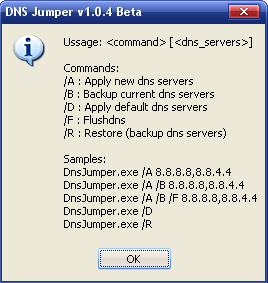
12. cmd suport added such as

13. if dns jumper doesn’t recognise your Network card (very rare) can still change dns server settings (choose all Network Cards and press Apply dns button)
14. German Language added
15. a few minor visual changes
- you can add your own language (just edit DnsJumper.ini )
- You can add or delete your own Dns server
- You can cusotmize Dns manually
- You can clear/ flush Dns cache with one click
- Program tests dns ip`s and measure the reaction time
- Fastest dns button test dns reaction times and write the Best one
Thanks to…
Luke (Italienisch Translater)
Chonghua (Chinese Translater)
Düng (Vietnamese Translater)
Robert (Swedish Translater)
Máté Miklósovics (hungarian Translater)
Pierre Duchemin (French Translater)
Florin (Romanian Translater)
Daisuke (Japanese Translater)
José Antonio Alvarez Domínguez (Spanish language Translater)
Andrey Zaikin (Russian Translater)
Pedro (Brazilian portuguese Translater)
kostas (Greek Translater)
Otto Souverein (Dutch Translater)
BaDrOO (Arabic Translater)
Hendriono (Indonesian Translater)
Akulla (Bulgarian Translater)
Mikrom (Czech Translater)
Nasrulloh (Javanese Translater)
CRC32: 4703E887
MD5: 35E94061CA67104D2B01EFF076384384
SHA-1: 50F16FEED61CB948360BC81974DE57579023FB81

DnsJumper is Portable and Freeware (The world’s first one click Portable dns changer)


Supported Languages : English , Turkish , German , Italianisch , Chinese , Vietnamese , Swedish , Hungarian , French , Japanese , Spanish , Russian , Portuguese (Brazilian) , Greek , Dutch , Romanian , Arabic , Indonesian , Bulgarian , Czech , Javanese
SOURCE OF SORDUM.COM

wasalamualaikum wr wb

Arek NGAJUM IsoIso Ae [ The Fully Fuckin' Headache Lion ]