Showing posts with label Windows. Show all posts

Saturday, January 31, 2015

REMOVE Hard disk Password on lenovo G400s

ASSALAMU'ALAIKUM WR WB

I think it was a great thinking about giving a security password for the hard disk drive on my client lapie. But i'm  truly wrong, my customer didn't like it very much.
And so not all my customer will like Windows 8.1. Now i have to repair both to what they like. 
First i need to remove first the hard disk password, for convenient to the user. Next i will clean install back to Windows 7.
Some peoples getting trouble with their hard disk password protected [ they afraid for forgotten password should make the hard drive be locked ]. They very worry that will be forgotten the password. They right cause will make them loosing their data when hard disk completely locked. Cause it will need to flash firmware to recovery.
But if you have made your own password or your password still work well but you want to remove it for more convenient this will be your answer.
If you really forgotten your password you are in the wrong place. Ok now take an attention on how to remove it from your computer bootup.

Follow these steps:

1. For lenovo G400s. Turn on your lapie.
2. Before lenovo logo showing up on the screen hold FN key and press few times F2.
3. After lenovo logo goes next the hard disk drive need your security password, give it.
4. Next lapie goes to BIOS setup.
5. On BIOS setup tab SECURITY.
6. Highlight SET HARDDISK PASSWORD and ENTER.

7. On ENTER MASTER PASSWORD type your current working hdd password and ENTER.
8. On CONFIRM MASTER PASSWORD, ENTER USER PASSWORD, and CONFIRM USER PASSWORD leave them BLANK. Just press ENTER on each Fields.
9. Now the hdd pasword is CLEAR, next you can do what you want.
10. Next tab EXIT highlight EXIT SAVING CHANGES and ENTER.
11. To proof it, at the first boot hold FN and press F2 few times. See if it doesn't need password anymore.
12. If it has cleared you will go to BIOS setup without any trouble and do what you need. Then reboot again.
13. Now i will install back Windows 7

That's all and THANK YOU

wassalamu'alaikum wr wb
                                                  

Arek NGAJUM IsoIso Ae [ The Fully Fuckin' Headache Lion ]

Saturday, September 20, 2014

Can't copy old backup files to a new folder on windows 8.1 resolved

ASSALAMUALAIKUM WR WB


In case of  backup necessary file(s) before changing my operating system, now i am facing a new trouble. I never could copy my old backup file(s) to a specific folder i want. I have new windows 8.1 installed on my old lappie.
This is an example maybe happening to you also. In my case i have lots of BlackBarry backup files on my old OS. But when i need one of these, i can't copy the file to the right place as BlackBerry Desktop Manager saving 'em all. Always show to me a pop-up say You don't have permission..or something like that. Event when i'm logging as administrator ( infact i'm this pc admin ) it still goes wrong. 

I've tried UNLOCKER a slim application that can do copy and event moving the files i want. But it doesn't resolving any trouble, the file has copied or moved to the correct backup folder. But on the BlackBerry Desktop Manager it's completely becomes very stupid and so silly. Because it's can see the file in his backup folder. 
Then i trying to resolved it by my self. Could help people too who has same trouble like mine. What is the first i knew the trouble is really simple.
It caused that i have different user name (admin) in my new OS. The old named HANNY-FAI but the new in new OS is Hanny FITRI. I thought it's my problem. And i wasn't wrong. Then i made a user names notice to prevent me doing wrong user name on typing.

NOTE: I have made changed to my user Document so it has moved to D:\ cause i don't want to loose anything in the Document if there is something wrong to %windows%.


This what i'm doing to robe my admin right.

1. Go to the folder containing files i need. Right clickin' my file.

2. And i choose Properties, and on the next window i'm doing to the Security tab. And Edit it.

3. On the next window i Remove this useless user permission owner's. Before doing this think twice, i don't have responsibility for future trouble, event it really helpful to me.

4. Then i typed my new current correct user name on Enter the object names field. Then doing Check Names.

5. Then i said OK

6. On the next window on the Permission for Hanny FITRI field i thick on Allow Full control, and the other do following automatically. Then Apply and OK.

7. The last step is to closing my old backup contain folder and re-open again to try to copy whatever i need to the new default backup folder. I paste it without any warned anymore. And so the BlackBerry Desktop Manager could read 'em out without any silly  action.


8. Now i can put 'em back to the handheld completely.

GRATEFULLY BEYOND THE RULES

wassalamualaikum wr wb


Arek NGAJUM IsoIso Ae [ The Fully Fuckin' Headache Lion ]

Tuesday, September 16, 2014

Important Update For Fresh Copy Of an Activated Windows 8.1 'till 09/15/2014

ASALAMUALAIKUM WR WB


Applied to everyone who has just install Windows 8.1 and activated the copy. Automatic Update must be sett to turn on.
But for first time it would like do nothing, just like there are no update from Microsoft. What we need to do to get the update is go to Start button ( right click it )>Control Panel>System and Security>Windows Update>Check for update.
Now your windows will check and calculate the update to the server. With a little hack to my weak connection i have made it. All updates installed to my new Windows 8.1 Pro 32bit. All download within 796,1 MB include three optional update i  need for supporting my jobs on mobile phone and computer repair.

UPDATES FOR WINDOWS 8.1 32 Edition:

Windows 8.1 Update is a cumulative set of security updates, critical updates and updates.
You must install Windows 8.1 Update to ensure that your computer can continue to receive
future Windows Updates, including security updates.
For a complete listing of the issues that are included in this update,
see the associated Microsoft Knowledge Base article for more information.
After you install this item, you may have to restart your computer.


Security Update for Windows 8.1 (KB2922229)
Installation date: ?15-?Sep-?14 7:49 AM
Installation status: Succeeded
Update type: Important

More information:
http://support.microsoft.com/kb/2922229
Help and Support:
http://support.microsoft.com

Windows Malicious Software Removal Tool for Windows 8 and Windows 8.1 - September 2014 (KB890830)
Installation date: ?15-?Sep-?14 7:54 AM
Installation status: Succeeded
Update type: Important

More information:
http://support.microsoft.com/kb/890830
Help and Support:
http://support.microsoft.com

Definition Update for Windows Defender - KB2267602 (Definition 1.183.2472.0)
Installation date: ?15-?Sep-?14 7:56 AM
Installation status: Succeeded
Update type: Important

More information:
http://www.microsoft.com/athome/security/spyware/software/about/overview.mspx
Help and Support:
http://go.microsoft.com/fwlink/?LinkId=52661

Update for Microsoft Camera Codec Pack for Windows 8.1 (KB2899189)
Installation date: ?15-?Sep-?14 7:57 AM
Installation status: Succeeded
Update type: Recommended

More information:
http://support.microsoft.com/kb/2899189
Help and Support:
http://support.microsoft.com

Security Update for Windows 8.1 (KB2964757) without KB2919355
Installation date: ?15-?Sep-?14 7:57 AM
Installation status: Succeeded
Update type: Important

More information:
http://support.microsoft.com/kb/2964757
Help and Support:
http://support.microsoft.com

Security Update for Internet Explorer Flash Player for Windows 8.1 (KB2987114)
Installation date: ?15-?Sep-?14 7:57 AM
Installation status: Succeeded
Update type: Important

More information:
http://support.microsoft.com/kb/2987114
Help and Support:
http://support.microsoft.com

Update for Windows 8.1 (KB2962409)
Installation date: ?15-?Sep-?14 8:52 AM
Installation status: Succeeded
Update type: Important

More information:
http://support.microsoft.com/kb/2962409
Help and Support:
http://support.microsoft.com

Update for Windows 8.1 (KB2894853)
Installation date: ?15-?Sep-?14 9:12 AM
Installation status: Succeeded
Update type: Important

More information:
http://support.microsoft.com/kb/2894853
Help and Support:
http://support.microsoft.com

Windows 8.1 Update (KB2919355)
Installation date: ?15-?Sep-?14 10:14 AM
Installation status: Succeeded
Update type: Important

More information:
http://support.microsoft.com/kb/2919355
Help and Support:
http://support.microsoft.com

Security Update for Windows 8.1 (KB2961908) without KB2919355
Installation date: ?15-?Sep-?14 10:15 AM
Installation status: Succeeded
Update type: Important

More information:
http://support.microsoft.com/kb/2961908
Help and Support:
http://support.microsoft.com

Update for Windows 8.1 (KB2975061)
Installation date: ?15-?Sep-?14 10:15 AM
Installation status: Succeeded
Update type: Important

More information:
http://support.microsoft.com/kb/2975061
Help and Support:
http://support.microsoft.com

Security Update for Windows 8.1 (KB2962123) without KB2919355
Installation date: ?15-?Sep-?14 10:16 AM
Installation status: Succeeded
Update type: Important

More information:
http://support.microsoft.com/kb/2962123
Help and Support:
http://support.microsoft.com

Security Update for Windows 8.1 (KB2920189)
Installation date: ?15-?Sep-?14 10:53 AM
Installation status: Succeeded
Update type: Important

More information:
http://support.microsoft.com/kb/2920189
Help and Support:
http://support.microsoft.com

Update for Windows 8.1 (KB2959626)
Installation date: ?15-?Sep-?14 10:53 AM
Installation status: Succeeded
Update type: Recommended

More information:
http://support.microsoft.com/kb/2959626
Help and Support:
http://support.microsoft.com

Update for Windows 8.1 (KB2962409)
Installation date: ?15-?Sep-?14 10:53 AM
Installation status: Succeeded
Update type: Important

More information:
http://support.microsoft.com/kb/2962409
Help and Support:
http://support.microsoft.com

Update for Windows 8.1 (KB2958262)
Installation date: ?15-?Sep-?14 10:53 AM
Installation status: Succeeded
Update type: Recommended

More information:
http://support.microsoft.com/kb/2958262
Help and Support:
http://support.microsoft.com

Cumulative Security Update for Internet Explorer 11 for Windows 8.1 (KB2977629)
Installation date: ?15-?Sep-?14 10:54 AM
Installation status: Succeeded
Update type: Important

More information:
http://support.microsoft.com/kb/2977629
Help and Support:
http://support.microsoft.com

Update for Windows 8.1 (KB2971203)
Installation date: ?15-?Sep-?14 11:17 AM
Installation status: Succeeded
Update type: Important

More information:
http://support.microsoft.com/kb/2971203
Help and Support:
http://support.microsoft.com

Security Update for Windows 8.1 (KB2918614)
Installation date: ?15-?Sep-?14 11:17 AM
Installation status: Succeeded
Update type: Important

More information:
http://support.microsoft.com/kb/2918614
Help and Support:
http://support.microsoft.com

Security Update for Windows 8.1 (KB2973201)
Installation date: ?15-?Sep-?14 11:17 AM
Installation status: Succeeded
Update type: Important

More information:
http://support.microsoft.com/kb/2973201
Help and Support:
http://support.microsoft.com

Cumulative Security Update for Internet Explorer 11 for Windows 8.1 (KB2976627)
Installation date: ?15-?Sep-?14 11:17 AM
Installation status: Succeeded
Update type: Important

More information:
http://support.microsoft.com/kb/2976627
Help and Support:
http://support.microsoft.com

Security Update for Windows 8.1 (KB2993651)
Installation date: ?15-?Sep-?14 11:17 AM
Installation status: Succeeded
Update type: Important

More information:
http://support.microsoft.com/kb/2993651
Help and Support:
http://support.microsoft.com

Security Update for Windows 8.1 (KB2964718)
Installation date: ?15-?Sep-?14 11:17 AM
Installation status: Succeeded
Update type: Important

More information:
http://support.microsoft.com/kb/2964718
Help and Support:
http://support.microsoft.com

Update for Windows 8.1 (KB2965142)
Installation date: ?15-?Sep-?14 11:17 AM
Installation status: Succeeded
Update type: Important

More information:
http://support.microsoft.com/kb/2965142
Help and Support:
http://support.microsoft.com

Update for Windows 8.1 (KB2950153)
Installation date: ?15-?Sep-?14 11:17 AM
Installation status: Succeeded
Update type: Recommended

More information:
http://support.microsoft.com/kb/2950153
Help and Support:
http://support.microsoft.com

Update for Windows 8.1 (KB2981655)
Installation date: ?15-?Sep-?14 11:31 AM
Installation status: Succeeded
Update type: Important

More information:
http://support.microsoft.com/kb/2981655
Help and Support:
http://support.microsoft.com

Update for Windows 8.1 (KB2979500)
Installation date: ?15-?Sep-?14 11:31 AM
Installation status: Succeeded
Update type: Recommended

More information:
http://support.microsoft.com/kb/2979500
Help and Support:
http://support.microsoft.com

Update for Windows 8.1 (KB2955164)
Installation date: ?15-?Sep-?14 11:31 AM
Installation status: Succeeded
Update type: Important

More information:
http://support.microsoft.com/kb/2955164
Help and Support:
http://support.microsoft.com

Security Update for Windows 8.1 (KB2957189)
Installation date: ?15-?Sep-?14 11:31 AM
Installation status: Succeeded
Update type: Important

More information:
http://support.microsoft.com/kb/2957189
Help and Support:
http://support.microsoft.com

Security Update for Windows 8.1 (KB2971850)
Installation date: ?15-?Sep-?14 11:31 AM
Installation status: Succeeded
Update type: Important

More information:
http://support.microsoft.com/kb/2971850
Help and Support:
http://support.microsoft.com

Update for Windows 8.1 (KB2971239)
Installation date: ?15-?Sep-?14 11:31 AM
Installation status: Succeeded
Update type: Important

More information:
http://support.microsoft.com/kb/2971239
Help and Support:
http://support.microsoft.com

Security Update for Windows 8.1 (KB2961072)
Installation date: ?15-?Sep-?14 11:31 AM
Installation status: Succeeded
Update type: Important

More information:
http://support.microsoft.com/kb/2961072
Help and Support:
http://support.microsoft.com

Security Update for Windows 8.1 (KB2939576)
Installation date: ?15-?Sep-?14 11:31 AM
Installation status: Succeeded
Update type: Important

More information:
http://support.microsoft.com/kb/2939576
Help and Support:
http://support.microsoft.com

Update for Windows 8.1 (KB2969817)
Installation date: ?15-?Sep-?14 11:31 AM
Installation status: Succeeded
Update type: Important

More information:
http://support.microsoft.com/kb/2969817
Help and Support:
http://support.microsoft.com

Security Update for Windows 8.1 (KB2988948)
Installation date: ?15-?Sep-?14 11:31 AM
Installation status: Succeeded
Update type: Important

More information:
http://support.microsoft.com/kb/2988948
Help and Support:
http://support.microsoft.com

Security Update for Windows 8.1 (KB2976897)
Installation date: ?15-?Sep-?14 11:31 AM
Installation status: Succeeded
Update type: Important

More information:
http://support.microsoft.com/kb/2976897
Help and Support:
http://support.microsoft.com

Update for Windows 8.1 (KB2989647)
Installation date: ?15-?Sep-?14 11:31 AM
Installation status: Succeeded
Update type: Important

More information:
http://support.microsoft.com/kb/2989647
Help and Support:
http://support.microsoft.com

Update for Windows 8.1 (KB2939153)
Installation date: ?15-?Sep-?14 11:31 AM
Installation status: Succeeded
Update type: Important

More information:
http://support.microsoft.com/kb/2939153
Help and Support:
http://support.microsoft.com

Update for Windows 8.1 (KB2981580)
Installation date: ?15-?Sep-?14 11:31 AM
Installation status: Succeeded
Update type: Important

More information:
http://support.microsoft.com/kb/2981580
Help and Support:
http://support.microsoft.com

Security Update for Windows 8.1 (KB2978668)
Installation date: ?15-?Sep-?14 11:31 AM
Installation status: Succeeded
Update type: Important

More information:
http://support.microsoft.com/kb/2978668
Help and Support:
http://support.microsoft.com

Update for Windows 8.1 (KB2966804)
Installation date: ?15-?Sep-?14 11:33 AM
Installation status: Succeeded
Update type: Recommended

More information:
http://support.microsoft.com/kb/2966804
Help and Support:
http://support.microsoft.com

Update for Windows 8.1 (KB2972094)
Installation date: ?15-?Sep-?14 11:33 AM
Installation status: Succeeded
Update type: Recommended

More information:
http://support.microsoft.com/kb/2972094
Help and Support:
http://support.microsoft.com

Update for Windows 8.1 (KB2984006)
Installation date: ?15-?Sep-?14 7:03 PM
Installation status: Succeeded
Update type: Optional

More information:
http://support.microsoft.com/kb/2984006
Help and Support:
http://support.microsoft.com

Security Update for Windows 8.1 (KB2962140)
Installation date: ?15-?Sep-?14 7:03 PM
Installation status: Succeeded
Update type: Important

More information:
http://support.microsoft.com/kb/2962140
Help and Support:
http://support.microsoft.com

Security Update for Windows 8.1 (KB2965788)
Installation date: ?15-?Sep-?14 7:03 PM
Installation status: Succeeded
Update type: Important

More information:
http://support.microsoft.com/kb/2965788
Help and Support:
http://support.microsoft.com

Update for Windows 8.1 (KB2956575)
Installation date: ?15-?Sep-?14 7:15 PM
Installation status: Succeeded
Update type: Important

More information:
http://support.microsoft.com/kb/2956575
Help and Support:
http://support.microsoft.com

Update for Windows 8.1 (KB2967917)
Installation date: ?15-?Sep-?14 7:15 PM
Installation status: Succeeded
Update type: Important

More information:
http://support.microsoft.com/kb/2967917
Help and Support:
http://support.microsoft.com

Security Update for Windows 8.1 (KB2972280)
Installation date: ?15-?Sep-?14 7:15 PM
Installation status: Succeeded
Update type: Important

More information:
http://support.microsoft.com/kb/2972280
Help and Support:
http://support.microsoft.com

Security Update for Windows 8.1 (KB2973351)
Installation date: ?15-?Sep-?14 7:16 PM
Installation status: Succeeded
Update type: Important

More information:
http://support.microsoft.com/kb/2973351
Help and Support:
http://support.microsoft.com

Definition Update for Windows Defender - KB2267602 (Definition 1.183.2505.0)
Installation date: ?15-?Sep-?14 7:25 PM
Installation status: Succeeded
Update type: Important

More information:
http://www.microsoft.com/athome/security/spyware/software/about/overview.mspx
Help and Support:
http://go.microsoft.com/fwlink/?LinkId=52661

Update for Windows 8.1 (KB2975719)
Installation date: ?15-?Sep-?14 7:35 PM
Installation status: Succeeded
Update type: Important

More information:
http://support.microsoft.com/kb/2975719
Help and Support:
http://support.microsoft.com

Definition Update for Windows Defender - KB2267602 (Definition 1.183.2533.0)
Installation date: ?15-?Sep-?14 7:47 PM
Installation status: Succeeded
Update type: Important

More information:
http://www.microsoft.com/athome/security/spyware/software/about/overview.mspx
Help and Support:
http://go.microsoft.com/fwlink/?LinkId=52661


UPDATES FOR Microsoft .NET Framework:

Security Update for Microsoft .NET Framework 4.5.1 on Windows 8.1 (KB2901128)
Installation date: ?15-?Sep-?14 7:49 AM
Installation status: Succeeded
Update type: Important

More information:
http://support.microsoft.com/kb/2901128
Help and Support:
http://support.microsoft.com

Security Update for Microsoft .NET Framework 3.5 on Windows 8.1 (KB2931358)
Installation date: ?15-?Sep-?14 7:54 AM
Installation status: Succeeded
Update type: Important

More information:
http://support.microsoft.com/kb/2931358
Help and Support:
http://support.microsoft.com

Security Update for Microsoft .NET Framework 4.5.1 on Windows 8.1 (KB2931366)
Installation date: ?15-?Sep-?14 10:15 AM
Installation status: Succeeded
Update type: Important

More information:
http://support.microsoft.com/kb/2931366
Help and Support:
http://support.microsoft.com

Security Update for Microsoft .NET Framework 3.5 on Windows 8.1 (KB2972213)
Installation date: ?15-?Sep-?14 11:17 AM
Installation status: Succeeded
Update type: Important

More information:
http://support.microsoft.com/kb/2972213
Help and Support:
http://support.microsoft.com

Security Update for Microsoft .NET Framework 4.5.1 and 4.5.2 on Windows 8.1 (KB2977765)
Installation date: ?15-?Sep-?14 11:17 AM
Installation status: Succeeded
Update type: Important

More information:
http://support.microsoft.com/kb/2977765
Help and Support:
http://support.microsoft.com

Security Update for Microsoft .NET Framework 4.5.1 on Windows 8.1 (KB2894856)
Installation date: ?15-?Sep-?14 11:17 AM
Installation status: Succeeded
Update type: Important

More information:
http://support.microsoft.com/kb/2894856
Help and Support:
http://support.microsoft.com

Security Update for Windows 8.1 (KB2993651)
Installation date: ?15-?Sep-?14 11:17 AM
Installation status: Succeeded
Update type: Important

Security Update for Microsoft .NET Framework 3.5 on Windows 8.1 (KB2973114)
Installation date: ?15-?Sep-?14 11:31 AM
Installation status: Succeeded
Update type: Important

More information:
http://support.microsoft.com/kb/2973114
Help and Support:
http://support.microsoft.com

Security Update for Microsoft .NET Framework 3.5 on Windows 8.1 (KB2894852)
Installation date: ?15-?Sep-?14 7:15 PM
Installation status: Succeeded
Update type: Important

More information:
http://support.microsoft.com/kb/2894852
Help and Support:
http://support.microsoft.com

Update for .NET Native on Windows 8.1 (KB2954879)
Installation date: ?15-?Sep-?14 7:15 PM
Installation status: Succeeded
Update type: Recommended

More information:
http://support.microsoft.com/kb/2954879
Help and Support:
http://support.microsoft.com

Security Update for Microsoft .NET Framework 3.5 on Windows 8.1 (KB2966826)
Installation date: ?15-?Sep-?14 7:16 PM
Installation status: Succeeded
Update type: Important

More information:
http://support.microsoft.com/kb/2966826
Help and Support:
http://support.microsoft.com

Security Update for Microsoft .NET Framework 3.5 on Windows 8.1 (KB2966828)
Installation date: ?15-?Sep-?14 7:16 PM
Installation status: Succeeded
Update type: Important

More information:
http://support.microsoft.com/kb/2966828
Help and Support:
http://support.microsoft.com


UPDATES FOR MS OFFICE 2010 32bit Edition:

Update for Microsoft Excel 2010 (KB2889836) 32-Bit Edition
Installation date: ?15-?Sep-?14 5:50 AM
Installation status: Succeeded
Update type: Important

More information:
http://support.microsoft.com/kb/2889836
Help and Support:
http://support.microsoft.com/?LN=en-us

Update for Microsoft InfoPath 2010 (KB2817396) 32-Bit Edition
Installation date: ?15-?Sep-?14 5:50 AM
Installation status: Succeeded
Update type: Important

More information:
http://support.microsoft.com/kb/2817396
Help and Support:
http://support.microsoft.com/?LN=en-us


Update for Microsoft Access 2010 (KB2553446) 32-Bit Edition
Installation date: ?15-?Sep-?14 5:50 AM
Installation status: Succeeded
Update type: Important

More information:
http://support.microsoft.com/kb/2553446
Help and Support:
http://support.microsoft.com/?LN=en-us

Update for Microsoft Office 2010 (KB2794737) 32-Bit Edition
Installation date: ?15-?Sep-?14 5:50 AM
Installation status: Succeeded
Update type: Important

More information:
http://support.microsoft.com/kb/2794737
Help and Support:
http://support.microsoft.com/?LN=en-us

Security Update for Microsoft Office 2010 (KB2826035) 32-Bit Edition
Installation date: ?15-?Sep-?14 5:50 AM
Installation status: Succeeded
Update type: Important

More information:
http://support.microsoft.com/kb/2826035
Help and Support:
http://support.microsoft.com/?LN=en-us

Update for Microsoft Office 2010 (KB2597087) 32-Bit Edition
Installation date: ?15-?Sep-?14 5:50 AM
Installation status: Succeeded
Update type: Important

More information:
http://support.microsoft.com/kb/2597087
Help and Support:
http://support.microsoft.com/?LN=en-us

Security Update for Microsoft Office 2010 (KB2810073) 32-Bit Edition
Installation date: ?15-?Sep-?14 5:51 AM
Installation status: Succeeded
Update type: Important

More information:
http://support.microsoft.com/kb/2810073
Help and Support:
http://support.microsoft.com/?LN=en-us

Security Update for Microsoft Office 2010 (KB2687423) 32-Bit Edition
Installation date: ?15-?Sep-?14 5:51 AM
Installation status: Succeeded
Update type: Important

More information:
http://support.microsoft.com/kb/2687423
Help and Support:
http://support.microsoft.com/?LN=en-us

Security Update for Microsoft Office 2010 (KB2880971) 32-Bit Edition
Installation date: ?15-?Sep-?14 5:51 AM
Installation status: Succeeded
Update type: Important

More information:
http://support.microsoft.com/kb/2880971
Help and Support:
http://support.microsoft.com/?LN=en-us

Update for Microsoft Office 2010 (KB2825640) 32-Bit Edition
Installation date: ?15-?Sep-?14 5:51 AM
Installation status: Succeeded
Update type: Important

More information:
http://support.microsoft.com/kb/2825640
Help and Support:
http://support.microsoft.com/?LN=en-us

Definition Update for Microsoft Office 2010 (KB982726) 32-Bit Edition
Installation date: ?15-?Sep-?14 5:51 AM
Installation status: Succeeded
Update type: Important

More information:
http://support.microsoft.com/kb/982726
Help and Support:
http://support.microsoft.com/?LN=en-us

Update for Microsoft Office 2010 (KB2878252) 32-Bit Edition
Installation date: ?15-?Sep-?14 5:52 AM
Installation status: Succeeded
Update type: Important

More information:
http://support.microsoft.com/kb/2878252
Help and Support:
http://support.microsoft.com/?LN=en-us

Update for Microsoft Office 2010 (KB2760598) 32-Bit Edition
Installation date: ?15-?Sep-?14 5:52 AM
Installation status: Succeeded
Update type: Important

More information:
http://support.microsoft.com/kb/2760598
Help and Support:
http://support.microsoft.com/?LN=en-us

Security Update for Microsoft Office 2010 (KB2553284) 32-Bit Edition
Installation date: ?15-?Sep-?14 7:54 AM
Installation status: Succeeded
Update type: Important

More information:
http://support.microsoft.com/kb/2553284
Help and Support:
http://support.microsoft.com/?LN=en-us

Update for Microsoft Outlook 2010 (KB2687567) 32-Bit Edition
Installation date: ?15-?Sep-?14 7:56 AM
Installation status: Succeeded
Update type: Important

More information:
http://support.microsoft.com/kb/2687567
Help and Support:
http://support.microsoft.com/?LN=en-us

Update for Microsoft SharePoint Workspace 2010 (KB2760601) 32-Bit Edition
Installation date: ?15-?Sep-?14 7:57 AM
Installation status: Succeeded
Update type: Important

More information:
http://support.microsoft.com/kb/2760601
Help and Support:
http://support.microsoft.com/?LN=en-us

Security Update for Microsoft Office 2010 (KB2878284) 32-Bit Edition
Installation date: ?15-?Sep-?14 7:57 AM
Installation status: Succeeded
Update type: Important

More information:
http://support.microsoft.com/kb/2878284
Help and Support:
http://support.microsoft.com/?LN=en-us

Security Update for Microsoft Office 2010 (KB2826023) 32-Bit Edition
Installation date: ?15-?Sep-?14 7:57 AM
Installation status: Succeeded
Update type: Important

More information:
http://support.microsoft.com/kb/2826023
Help and Support:
http://support.microsoft.com/?LN=en-us

Security Update for Microsoft Office 2010 (KB2881071) 32-Bit Edition
Installation date: ?15-?Sep-?14 7:58 AM
Installation status: Succeeded
Update type: Important

More information:
http://support.microsoft.com/kb/2881071
Help and Support:
http://support.microsoft.com/?LN=en-us

Update for Microsoft Office 2010 (KB2837606) 32-Bit Edition
Installation date: ?15-?Sep-?14 7:58 AM
Installation status: Succeeded
Update type: Important

More information:
http://support.microsoft.com/kb/2837606
Help and Support:
http://support.microsoft.com/?LN=en-us

Definition Update for Microsoft Office 2010 (KB982726) 32-Bit Edition
Installation date: ?15-?Sep-?14 7:58 AM
Installation status: Succeeded
Update type: Important

More information:
http://support.microsoft.com/kb/982726
Help and Support:
http://support.microsoft.com/?LN=en-us

Update for Microsoft Word 2010 (KB2880529) 32-Bit Edition
Installation date: ?15-?Sep-?14 7:58 AM
Installation status: Succeeded
Update type: Important

More information:
http://support.microsoft.com/kb/2880529
Help and Support:
http://support.microsoft.com/?LN=en-us

Update for Microsoft Office 2010 (KB2589298) 32-Bit Edition
Installation date: ?15-?Sep-?14 7:58 AM
Installation status: Succeeded
Update type: Important

More information:
http://support.microsoft.com/kb/2589298
Help and Support:
http://support.microsoft.com/?LN=en-us

Update for Microsoft Visio Viewer 2010 (KB2837587) 32-Bit Edition
Installation date: ?15-?Sep-?14 7:59 AM
Installation status: Succeeded
Update type: Important

More information:
http://support.microsoft.com/kb/2837587
Help and Support:
http://support.microsoft.com/?LN=en-us

Update for Microsoft Office 2010 (KB2837581) 32-Bit Edition
Installation date: ?15-?Sep-?14 8:52 AM
Installation status: Succeeded
Update type: Important

More information:
http://support.microsoft.com/kb/2837581
Help and Support:
http://support.microsoft.com/?LN=en-us

Update for Microsoft Office 2010 (KB2589375) 32-Bit Edition
Installation date: ?15-?Sep-?14 8:52 AM
Installation status: Succeeded
Update type: Important

More information:
http://support.microsoft.com/kb/2589375
Help and Support:
http://support.microsoft.com/?LN=en-us

Update for Microsoft Office 2010 (KB2589352) 32-Bit Edition
Installation date: ?15-?Sep-?14 8:52 AM
Installation status: Succeeded
Update type: Important

More information:
http://support.microsoft.com/kb/2589352
Help and Support:
http://support.microsoft.com/?LN=en-us

Update for Microsoft Visio 2010 (KB2880526) 32-Bit Edition
Installation date: ?15-?Sep-?14 8:52 AM
Installation status: Succeeded
Update type: Important

More information:
http://support.microsoft.com/kb/2880526
Help and Support:
http://support.microsoft.com/?LN=en-us

Update for Microsoft Office 2010 (KB2687502) 32-Bit Edition
Installation date: ?15-?Sep-?14 8:52 AM
Installation status: Succeeded
Update type: Important

More information:
http://support.microsoft.com/kb/2687502
Help and Support:
http://support.microsoft.com/?LN=en-us

Update for Microsoft Office 2010 (KB2825635) 32-Bit Edition
Installation date: ?15-?Sep-?14 8:53 AM
Installation status: Succeeded
Update type: Important

More information:
http://support.microsoft.com/kb/2825635
Help and Support:
http://support.microsoft.com/?LN=en-us

Update for Microsoft OneNote 2010 (KB2837595) 32-Bit Edition
Installation date: ?15-?Sep-?14 8:53 AM
Installation status: Succeeded
Update type: Important

More information:
http://support.microsoft.com/kb/2837595
Help and Support:
http://support.microsoft.com/?LN=en-us

Security Update for Microsoft Office 2010 (KB2850016) 32-Bit Edition
Installation date: ?15-?Sep-?14 8:53 AM
Installation status: Succeeded
Update type: Important

More information:
http://support.microsoft.com/kb/2850016
Help and Support:
http://support.microsoft.com/?LN=en-us

Update for Microsoft Filter Pack 2.0 (KB2878281) 32-Bit Edition
Installation date: ?15-?Sep-?14 8:53 AM
Installation status: Succeeded
Update type: Important

More information:
http://support.microsoft.com/kb/2878281
Help and Support:
http://support.microsoft.com/?LN=en-us

Update for Microsoft PowerPoint 2010 (KB2837579) 32-Bit Edition
Installation date: ?15-?Sep-?14 8:54 AM
Installation status: Succeeded
Update type: Important

More information:
http://support.microsoft.com/kb/2837579
Help and Support:
http://support.microsoft.com/?LN=en-us


Update for Microsoft InfoPath 2010 (KB2817369) 32-Bit Edition
Installation date: ?15-?Sep-?14 8:54 AM
Installation status: Succeeded
Update type: Important

More information:
http://support.microsoft.com/kb/2817369
Help and Support:
http://support.microsoft.com/?LN=en-us


After all have done, do not forget to stay turn your Automatic Update ON, so you won't feel like a pushing hard Windows XP sp3 into Metro PCS

wasalamualaikum wr wb


Arek NGAJUM IsoIso Ae [ The Fully Fuckin' Headache Lion ]

Monday, November 25, 2013

Slipstream Office 2010 setup with SP2


ASALAMUALAIKUM WR WB

Jumpa lagi dengan singo mumeth alias the fully fuckin' headache lion. Kali ini gak perlu banyak basa basi mari kita belajar membuat slipstream office 2010 dengan bantuan Command Prompt.
Dari sekian banyak guru ternyata guru saya Paul Thurrot dan HAL9000 adalah guru yang paling sederhana dan simple dalam memberi pelajaran mengenai CMD.exe pada saya. Dan terbukti dengan apa yang akan saya jelaskan berikut ini.
Sedang giat untuk belajar CMD lebih dalam agar bila nanti saya telah beralih ke Linux tidak terlalu terkejut dengan segala keruwetan syntax nya.
OK balik lagi ke office 2010.

Siapkan peralatan perang sebagai berikut:

1. CD/DVD instalasi office 2010.
2. Bila tidak punya CD/DVD silakan download file .exe instalasi office 2010 dari link dibawah
32bit


64bit


3. File office 2010 service pack 2 dapat di download gratis dari link dibawah


Langkah kerja:

1. Buat 2 buah folder baru di root C:\DVD dan C:\SP2
slipstreaming 1

2. Copy file X16-32250.exe dan officesp2010-kb2687455-fullfile-x86-en-us.exe ke drive root C:
slipstreaming 2

3. Klik Start > ketik CMD pada kolom Search > klik kanan cmd.exe pilih Run as administrator.
4. Setelah cmd terbuka buat perintah pertama sebagai berikut;
c:\x16-32250.exe<space>/extract:c:\dvd<enter>
slipstreaming 3

Note: <space> dan <enter> tidak perlu diketikan. tekan tombol space dan enter pada titik tersebut
        <space> and <enter> should not typed on cmd syntax, need only to hit the button on your keyboard
5. Lanjutkan dengan mengetikkan perintah berikut ini:
c:\officesp2010-kb2687455-fullfile-x86-en-us.exe<space>/extract:c:\sp2<enter>
slipstreaming 4
Lihat gambar dibawah untuk melanjutkan ekstrak file sp2
slipstreaming 5
slipstreaming 6

**see Note on point number 4
6. Setelah selesai proses nomor 5 ketik exit untuk keluar dari cmd.exe
slipstreaming 7

7. Buka C:\SP2 dan copy seluruh file yang ada didalamnya tanpa terkecuali kemudian paste-kan ke C:\DVD\Updates.
slipstreaming 8
slipstreaming 9

8. Tutup semua jendela yang masih terbuka termasuk ritsleting anda eee...maksudnya jendela yang masih terbuka.
Note: File X16-32250.exe dapat anda ekstak mengunakan 7-zip atau WinRar. Namun jangan anda lakukan karena anda tidak akan menemukan kehebatan hasil ekstrak seperti yang dilakukan oleh cmd.exe.
Mengapa: bila anda ekstrak dengan software ekstaktor maka anda perlu waktu tambahan untuk membuat beberapa folder dan memasukkan semua file hasil ekstrak kedalam folder-folder tersebut serta menyesuaikan nama folder dan file setup.
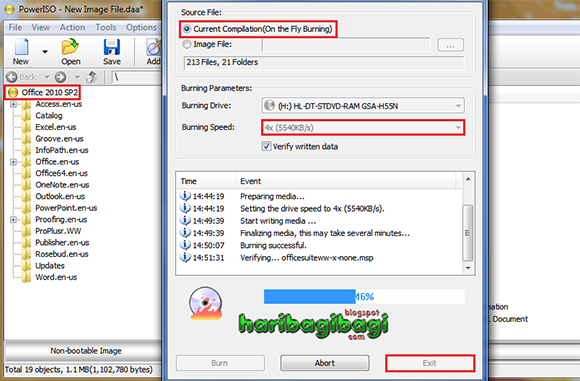
9. Berikutnya buka/jalankan PowerISO atau program Burning kesayangan anda yang sudah fasih anda gunakan. Kalau saya sangat suka dengan kesederhanaan dan kehebatan PowerISO.
Pada menu PowerISO klik Add > Add files and folders...
10. Browse folder C:\DVD anda dan blok semua file yang ada di dalamnya dengan cara klik file teratas kemudian tahan tombol Ctrl+Shift dan tekan tombol keyboard Panah turun, selanjutnya klik Add.

11. Rename icon DVD menjadi Office 2010 SP2 atau apasaja yang dapat memudahkan anda untuk mengingatnya.
12. Klik icon Burn pada menu PowerISO, tunggu proses Burning dan Verify selesai lalu Exit.
"Remember on PowerISO do not use Default Maximum speed on Burning, always change that to the lower one".
Burning 1

13. Test hasil kerja anda.
Burning 2
Burning 3

14. SELESAI, SEMOGA BERMANFAAT

TERIMA KASIH ATAS KUNJUNGAN TEMAN-TEMAN NEWBIE SAK DJAGAT

Thank you verymuch to Paul Thurrot and HAL9000
simple explanation with great goal  indeed


wasalamualaikum wr wb


Arek NGAJUM IsoIso Ae [ The Fully Fuckin' Headache Lion ]

Tuesday, November 19, 2013

ANDROID USB Driver for Intel Processor [ Intel® USB Driver for Android* Devices ]

ASALAMUALAIKUM WR WB


I don't want to show how to install this driver to your Windows system, because it has clear explanation by Intel®. Read carefully so you won't  to make any mistakes.
I only want to guide you on how to download it from the Intel® website, because they have some rules for this. Okay i will show you how to do. Remember that i will not give any reply for question on the comment for this post. If  you have read all, you never loose the way.

First 
There you'll see this kind of picture onthe site
Intel Android usb driver-1
Click the Download Button there to start.

Second
On the next page you'll see the License Agreement term.
Scroll  down and click [v] I accept then Continue
Intel Android usb driver-2
Intel Android usb driver-4

Third
On the next Download page, before downloading first choose the newest version there. Then click Download to have it.
Intel Android usb driver-5

That's all the easy way to download from Intel® website's

The Intel® Android USB Driver package will enable you to connect your Windows* based machine to your Android device that contains an Intel Atom processor inside.

Note: The Intel® USB Driver package version 1.1.5 is designed for Android App developer usage with added support of Microsoft Windows* 8. For consumer device support, please check with your device manufacturer. There is also a download link provided for earlier version 1.1.4 of the driver in the following download

Microsoft Windows*
Windows 8 (32/64-bit), Windows 7 (32/64-bit), Windows Vista (32/64-bit), Windows XP (32-bit only)


This document will guide you through installing the Intel® Android USB Driver package which will enable you to connect your Windows* based machine to your Android device that contains an Intel Atom™ processor inside.
System Requirements

Hardware Requirements:
Android Mobile device with the Intel® Atom Processor Z2460 inside.
A micro-USB to USB cable (same cable used to charge device)

Supported Host Operating Systems:
Windows 7 (32/64-bit)
Windows Vista (32/64-bit)
Windows XP (32-bit only)

Supported Android Device Operating Systems:
Android 2.3.7 – Gingerbread (GB)
Android 4.0.x – Ice Cream Sandwich (ICS)

Installation steps
Warning: Make sure you do not have your Android device connected to your computer during the installation process.

        Download the installer package from http://software.intel.com/en-us/articles/intel-android-device-usb-driver
        Run the installer and accept the Windows User Account Control (UAC) prompt, if applicable.
        You will see the following screen. Click Next to continue. (If the installer detects an older version of the driver, accept to uninstall it.)

        You will see the following screen. Read and agree to the Intel Android USB Driver End-User License Agreement (EULA).

        You will prompted to select components as seen on the screen below. Click on next button to proceed.

        Choose the path for the installation and click Install.

        The installer will proceed to install Android USB drivers. This may take a few minutes to complete.

        After the driver installation is completed, click OK on the pop-up note and then click on Finish to close the installation program.

Supported USB profiles

After installing the USB driver package, plug in your Android device to your computer using your micro-USB to USB cable. The following are the supported USB profiles via the Intel Android USB Driver package:

    ADB (Android Debug Bridge): This is the debug interface of Android. It is mandatory to ise in order to re-flash, and debug.
    To enable/disable:
        ICS: Settings > Developer options > USB Debugging
        GB: Settings > Applications > Development > USB Debugging

    MTP (Media Transfer Protocol): This is Windows protocol to facilitate the transfer of media files.
    To enable/disable:
        ICS: Settings > Storage > Click context menu > USB Computer connection > MTP

    PTP (Picture Transfer Protocol): This is Windows protocol to allow the transfer of images from digital cameras to computers.
    To enable/disable:
        ICS: Settings > Storage > Click context menu > USB Computer connection > PTP

    RNDIS: This functionality provides a virtual Ethernet link using phone network.
    To enable/Disable
        ICS: Settings > More… > Tethering and portable hostpot > USB tethering
        GB: Settings > Wireless & Network > Tethering and portable hostpot > USB tethering

    CDC Serial (Modem AT Proxy): This functionality provides the link to Modem to allow to use AT commands through a virtual com port:
            Enable: setprop persist.ril-daemon.disable 0
            Disable: setprop persist.ril-daemon.disable 1
            Enable: setprop persist.system.at-proxy.mode 1
            Disable: setprop persist.system.at-proxy.mode 0

Troubleshooting

If device is not recognized as an Android device, try following steps to resolve the problem.

Check Windows Device Manager
Open Windows Device Manager:

    You may see USB Mass Storage instead of ADB Device. If it’s the case, right click on Mass Storage device icon and select ‘Uninstall’. Then unplug your device from the computer and install drivers’ setup again
    You may see Android Device with yellow warning icon. If it’s the case, right click on Android Device icon and select ‘Uninstall’. Then unplug your device from the computer and install drivers’ setup again

Make sure the device you are attempting to connect has USB debugging enabled.

In Android 2.3 (Gingerbread) devices the option is under Settings > Applications > Development.

In Android 4.0.x (Ice Cream Sandwich) devices the option is under Settings > Development Options.

Further Questions & Support
For other troubleshooting support, post questions on the Intel support forum for Android developers: (http://www.intel.com/software/android)

Microsoft Windows*
Windows 8 (32/64-bit), Windows 7 (32/64-bit), Windows Vista (32/64-bit), Windows XP (32-bit only)
Installation Guide & System Requirements - Windows

   
File Description:
File Size:
MD5 Checksum:
System Driver
8.8 MB
Add soon
Add soon


There are downloads available under the Intel Android Device USB Driver End-User License Agreement license. Download[http://software.intel.com/protected-download/385047/185407]

If you are a Developer of android application and want to trying the application on the virtual machine based on Intel architecture you need ANDROID SDK and so install Intel Hardware Accelerated Execution Manager [ HAXM ]
Intel HAXM-1
Before you install this setup you'll need to activate Virtualization Technology on BIOS setup by choosing Advance menu. Change by click Enter that disable to enable using arrow key on you keyboard and Enter again. Save the settings by pressing F10 and enter. here you done. and can start to install HAXM on the next Windows start.
Intel HAXM-2


That's all i want to share to you all, if i have something interesting i will post again on this site.
THANK YOU VERY MUCH FOR ALL NOOBS
wasalamualaikum wr wb


Arek NGAJUM IsoIso Ae [ The Fully Fuckin' Headache Lion ]