Showing posts with label Tips Trik MCN Pro. Show all posts

Thursday, November 28, 2013

Repair Bad/Strange China Phones IMEI using MCNPro Box

ASALAMUALAIKUM WR WB


Could You make a communication using your device without it ?
Simply IMEI is the soul of every phone device all over the world, without this you can't make any communication. 
For China phones devices it is very-very easy to repair IMEI of your Device, even it has multiple IMEI number. You can do it with non legal tool. It's so easy. But now i wanna show how to fix it using a legal tool called MCNPro Box the universal China phones flasher box.

The Steps below :

1. Run MCNPro Box.exe, on china phones has MTK/MT cpu based it will work fine through Rx Tx Scan method. But for others you need using USB Scan method [ it's little terrible to other cpu ]
2. Scan the device and hold power button or boot button [ sometimes need other as boot button ]
3. When scanning complete, Apply the result to the box by click Apply.
4. First at all try to read phone firmware for backup. Give it name for ex: something.BIN for the firmware. Next Backup NV Data, this is the most important to repair IMEI and save it as ex: something_NV.BIN
5. Now on the IMEI Options: click Read for the first IMEI number on the phone and next the second's.
6. Note: Please write on Notepad or on apiece of paper all IMEI number on the phone label. usually they typed on the label right on the phone battery case, so write 'em all.
mcnimei-1
7. Now go to Read/Write Flash: on the field click browse and find out your NV Data had backed up. This will really important to do repair IMEI. If you don't have that, the last 15 digits IMEI number won't automatically writen on the field.
8. Type both IMEI number to the fields of each. Next click Write to writing correct valid IMEI number to the device.
mcnimei-2
9. Compare your bad IMEI with the new just written. 
10. Proof it that the IMEI has correctly written without any mistakes by click Format Button on MCNPro Box. Then after formatting finish Read back the phone IMEI's.
mcnimei-3
11. Take a look at MCNPro result log, are they still there, if it's yes you're lucky one. You do the right job

And Now the phone is ready to communicate with it's friends around the country.
GOOD JOB ALWAYS GIVE A TRUSTED 

That's all what we need. Keep fight NOOBS....
Thank you for your coming

wasalamualaikum wr wb


Arek NGAJUM IsoIso Ae [ The Fully Fuckin' Headache Lion ]

Sunday, April 7, 2013

Read Flash Coolsand RDA 8853A

ASALAMUALAIKUM WR WB


1. Open MCNPro 2.1.5 ver 3.4.6 [Latest]
2. Tab Coolsand/RDA on the right, keep Bootloader : AUTO

3. Now press Start or T by your keyboard then hold boot on your device and Apply to box of status

4. Next press Read to gathering the device firmware and save it as device type and model

5. A good job with little beat easy step by Surya Jaya Phones

Have a good day and thank you for joining to haribagibagi.blogspot.com you're all really appreciate here.

wasalamualaikum wr wb


Arek NGAJUM IsoIso Ae [ The Fully Fuckin' Headache Lion ]

Saturday, March 2, 2013

Read Firmware CROSS M 96 T [ Mstar ]

ASALAMUALAIKUM WR WB


Have no phone firmware to fix phone software trouble, but have a phone on hand ??? this is the most good answer for collect a firmware.

1. Run your MCN Pro box, for the best use the latest version of it.

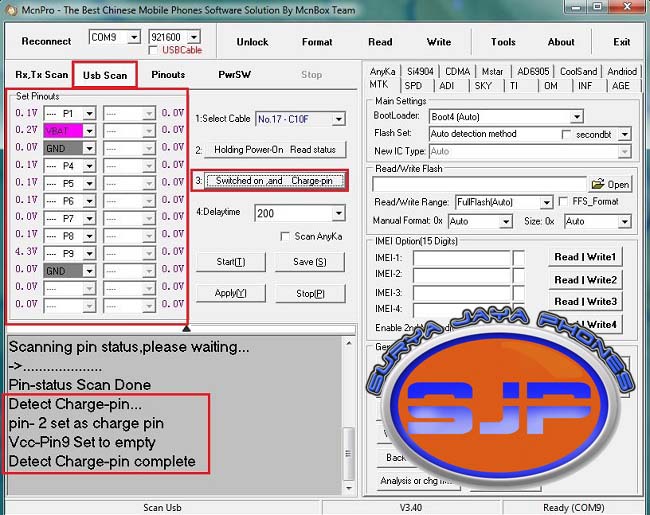
2. Hit Usb Scan on UI, select compatible cable for phone. Connect USB to the phone and give it PS from the clamps then hit Holding Power On Read status.
3. Next hit Switched on and Charge pin. Hold continuosly BOOT button 'till all pins already detected.

4. Watch carefully every time the phone boot up, see the battery charging and/or battery message on the phone display on each boot up display. For battery charging or battery message you should hit YES for others hit NO.

5. See also Task Bar notification for your system installing USB Driver.
6. Next is the time for gathering of what we need, yesss....the phone firmware exactly. Hit Read button on UI to get it.

7. Save your firmware.

No more begger for firmware during next task to perform repairing phone software trouble. That all we need for everytime fix CHINA phones.

THANK YOU

wasalamualaikum wr wb


Arek NGAJUM IsoIso Ae [ The Fully Fuckin' Headache Lion ]

Wednesday, February 13, 2013

Read Flash MITO S500 [ MTK 6250 ]

ASALAMUALAIKUM WR WB


This trick apply to MCN Pro Box only.
To resolving an error occure on Rx, Tx Scan method on every device need to fix. Hope it can give an easy step to do.

On every task we do by Rx, Tx Scan using MCN Pro that failed, there is a way for other method to try before we say gave up by hardware trouble on the device. It only need more patient and little think.

This method call USB Scan by MCN Pro Box Team. So how to perform this step ??? easily, this is the only answer.

Open your MCN Pro. On the UI hit USB Scan. Change Baudrate to 115200, this is the MTK Flashtool always sett on every MTK chipset. Now we got to apply this to MCN Pro, the reason is MTK tool use it sett by default.

Select compatible cable we're use on the drop down box of Select cable. Next hit task 2. Holding Power....., so it will says Pin-status Scan Done.
Then hit task 3. Switched on....[ don't forget to press and hold simultanous the BOOT button on the device untill all the pins detected ].

Next step hit Start to running pinout scanning then hit Apply
While holding the boot button, always to see on the device display for the battery icon. In every phone start always see the battery icon is there any change or not. If the battery icon run up and down that mean CHARGING so you need to hit YES on question window appear. If it doesn't just hit NO.


When USB pinouts has detected your Taskbar will also give you a message, see below

Now is your time to READ FLASH [ phone firmware ] and save it for your own collect of china firmware so you don't need to beg to other or in any forum.

Now you have increase your own china phone firmwares to fix the same brand and type of phone.

Thank you to all the NOOBs all over the world

wasalamualaikum wr wb


Arek NGAJUM IsoIso Ae [ The Fully Fuckin' Headache Lion ]

Saturday, January 5, 2013

Read Flash Spreadtrum via MCNPro Box

ASALAMUALAIKUM WR WB

Commons boot button for Spreadtrum [SPD] Chipsets : key *, key #, key 1, key 2, Call key, etc.

The phone  is china brand smartphone CROSS PD8 with touchscreen and dual sim on.
Flasher Box is MCNPro Box with latest version 3.4.1 [ download it using mcnpro updater/ USA server ]

1. It was really confusing me on how to connect spreadtrum to mcnpro all day long, even i used this new version of mcnpro it still bugs found for spreadtrum and latest mtk. Holly shit!!!
2. Start your mcnpro, do not make any change to the default settings on the first open. Leave all by default.

3. Click on Usb Scan button. Select the cable on point 1. Then do point 2 of Holding Power On Read Status, NOTICE: on this step remember that you don't need to press and hold Power button or other key, just click point 2 button on your mcnpro to read USB status [ because it is not the pinouts ]
4. After you got Pin status Scan Done message, click Start then press and holding the CALL button that sign number 1.

5. Keep press and hold your CALL button 'till you heard ding, ding of your PC sound and the COM number has changed. Never lose your press and hold the CALL button
6. When the COM number has change you should click on Apply quickly. Now you can release the CALL button.

7. Now your Spreadtrum has detected and so the bootloader as well. But you need to wait for moments and keep on eye to the COM port setting will happens. If there is not change on the COM port that has detected that mean your mcnpro works. But when you loss it by it COM port setting changing that mean you lose the connection to the phone or your mcnpro goes STUPID, so you need to do the same steps before.

8. First do Read Flash to backup the flash firmware from the phone for own archive. So far this is what i can do to SPD 6610. Then try to Read NV Data from phone

9. When you try to read NV Data see what will happen to your mcnpro box, in my case it becomes stop working and need to click Reconnect to wake up this STUPIDITY. So you will understanding when i said there is still have bugs in this new version. That why its beat by VOLCANO and GPG Dragon

Hopefully Useful for Learning

wasalamualaikum wr wb


Arek NGAJUM IsoIso Ae [ The Fully Fuckin' Headache Lion ]

Friday, December 28, 2012

Flashing CROSS P1T [ MTK 6252 ] via MCN Pro

ASALAMUALAIKUM WR WB

First before you do a job further there is some tricks to make the able to boot by USB on MCN Pro Box.

1. You have had MTK USB VCOM installed on your system
2. One piece of Keyboard dome for phone booting key
3. MCN Pro Box with correct COM setting
4. Flash cable No. 30 [ C5C ]

How to do :

1. Prepare little piece of transparent tape and a dome keypad

2. Open your front case of phone, place the new keypad you've made on the left up corner of your phone board. See picture below.

3. I assume you have prepared your MCN Pro box already, now open this program. Check it on Device manager does it has right COM setting

4. Set your MCN Pro to scanning usb by click Usb Scan button.

5. Make settings as picture below, then click button no.2 [ Holding Power On Read Status ] but you do not need to press and hold the power button and it will keeps scanning.

6. Next to start scanning the pinouts just click Start button, then press and hold your new boot button and then press and hold power button too. See what will happen

7. When MCN Pro has detect pinouts and your device your system will show you a pop-up on the bottom right corner of MTK USB Port ready to use. You can start to do everything to your device by now. See in Device Manager where the port is

8. Before starting any job you better SAVE it firts then APPLY to box. Then you can do more

9. Now backup your device firmware first before doing some fixes to the device

10. Now do what you wanna do to your device 'cause you have detect it nicely via MCN Pro Box.
THANK YOU FOR COMING

wasalamualaikum wr wb

Arek NGAJUM IsoIso Ae [ The Fully Fuckin' Headache Lion ]

Thursday, July 26, 2012

MCNPro Box Terbaru v2.1.2 [ 26 Juli 2012 ]

Alamualaikum WR WB

       26 Juli 2012 MCNBox Team merilis versi installer terbaru untuk MCNPro Box. Versi baru MCNBox ini adalah versi 2.1.2 untuk intallernya dan update nya MCNpro box.exe versi 3.3.1
Silakan anda download dari link saya berikan berikut ini bagi rekan-rekan yang belum dapat mengaktifkan tiket downloadnya di support area.


SILAKAN DOWNLOAD DI LINK BERIKUT


       Ektrak semua file hasil download
       Uninstall versi terdahulu
       Instal setup terbarunya


Selamat berkarya

wasalamualaikum wr wb

Arek NGAJUM IsoIso Ae [The Fully Fuckin' Headache Lion]